

You open your own website and wait. The logo appears, then an empty space, then finally the rest of the page. If it feels slow to you, it feels even slower to a first-time visitor who has never heard of your business. They have a back button, and your competitors are one search away.
A slow WordPress website is rarely caused by one thing. It’s usually several small problems adding up: oversized images, too many plugins, budget hosting, and scripts nobody remembers adding. The good news is that most of them can be found and fixed without rebuilding your site.
In this guide, you’ll learn how to check whether your site is actually slow, the 10 most common causes, and which fixes make the biggest difference.
Quick answer
Most WordPress websites are slow because of unoptimized images, too many or poorly built plugins, slow hosting, missing caching, and heavy page builders or themes. Start by testing your site with Google PageSpeed Insights, then fix the biggest issues first: compress your images, set up caching, remove plugins you don’t need, and upgrade your hosting if your server responds slowly.
Is your WordPress website actually slow? How to check
Before fixing anything, get a real measurement. How fast your site feels on your office Wi-Fi isn’t how it performs for a customer on a phone in another country.
- Go to Google PageSpeed Insights and enter your homepage URL.
- Look at the Mobile results first. Most visitors browse on phones, and Google primarily uses the mobile version of your site for ranking.
- Check the Core Web Vitals section. If it shows real-user data, that’s how your site performs for actual visitors.
- Test your most important pages too, not just the homepage: service pages, landing pages, and product pages.
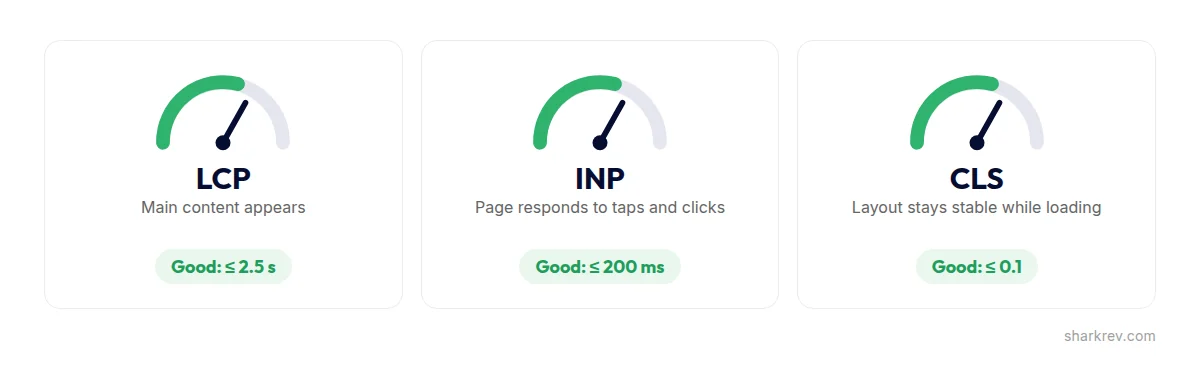
Focus on the three Core Web Vitals, which Google uses to measure real-world page experience:
- Largest Contentful Paint (LCP): how long the main content takes to appear. Good is 2.5 seconds or less.
- Interaction to Next Paint (INP): how quickly the page responds when someone taps or clicks. Good is 200 milliseconds or less.
- Cumulative Layout Shift (CLS): how much the page jumps around while it loads. Good is 0.1 or less.
If your results are orange or red, keep reading. One or more of the causes below is almost certainly involved.
10 common reasons your WordPress website is slow
1. Slow or overcrowded hosting
Your hosting is the foundation everything else sits on. Cheap shared hosting puts your website on a server with hundreds of other sites competing for the same resources. When one of them gets busy, yours slows down too.
How to spot it: in PageSpeed Insights, look for a warning about server response time (also called Time to First Byte). If your server takes a long time to respond before anything starts loading, no amount of image optimization will fully fix it.
The fix: move to quality managed WordPress hosting or a well-configured cloud server. For a business website, better hosting is one of the most cost-effective ways to buy speed.
2. Large, unoptimized images
This is one of the most common causes of a slow WordPress site. A single photo straight from a camera or stock website can be several megabytes, often more than the rest of the page combined. Put ten of those on a homepage and every visitor downloads far more than they need.
The fix: resize images to the size they’re actually displayed, compress them, and serve them in a modern format like WebP. Make sure lazy loading is on, so images further down the page only load when visitors scroll to them. WordPress does this by default, but some themes and builders override it.
3. Too many plugins, or the wrong ones
Plugins are one of WordPress’s biggest strengths, but every plugin can add code, database queries, and files that load on every page. The number isn’t the only problem. One badly built plugin can slow a site down more than twenty lightweight ones.
The fix: remove plugins you no longer use, replace plugins that do overlapping jobs, and check which ones load files on pages where they aren’t needed, like a contact form plugin that loads on every page instead of just the contact page.
4. No caching
Without caching, WordPress builds every page from scratch for every visitor: running code, querying the database, and assembling the page. Caching saves a ready-made version of each page, so it can be delivered almost instantly.
The fix: use one caching solution. Many quality hosts provide server-level caching. If yours doesn’t, a well-configured caching plugin does the job. Avoid stacking several caching plugins, because they often conflict and break layouts.
5. A heavy page builder or bloated theme
Page builders like Elementor make designing easy, but they can add extra code, deeply nested containers, and scripts. Multipurpose themes that promise hundreds of features often load code for all of them, even if you only use a few.
The fix: you usually don’t need to rebuild. Simplify layouts, reduce nested sections, turn off widgets and features you don’t use, and enable your builder’s built-in performance settings.
Not sure which of these is slowing your site down?
Most slow websites have three or four of these problems at once. We’ll pinpoint exactly what’s holding yours back and fix it without breaking what already works.
Get Your Website Speed Fixed6. Too many third-party scripts
Live chat widgets, analytics tags, heatmaps, social feeds, embedded videos, booking widgets, and pop-ups. Each one loads code from another company’s server, and your page often waits for it.
The fix: review every script on your site and ask one question: is this bringing in business? Remove what isn’t, and delay non-essential scripts, like chat widgets, until after the page has loaded.
7. Outdated PHP, WordPress, or plugins
WordPress runs on PHP, and newer PHP versions are faster and more secure than older ones. Many business websites still run outdated versions simply because nobody updated them.
The fix: check your PHP version in your hosting control panel and update to a currently supported version. Take a backup and test on a staging site first. Keep WordPress, your theme, and your plugins updated too.
8. A bloated database
Over time, your database collects clutter: hundreds of post revisions, spam comments, expired temporary data, and leftover tables from plugins you deleted years ago. The more clutter, the harder your database has to work on every page load.
The fix: clean out old revisions, spam, and expired data, limit how many revisions WordPress keeps, and remove tables left behind by old plugins. Always back up before changing your database.
9. No CDN for visitors in other countries
If your server is in one country and your customers are spread across the US, UK, Europe, or Australia, every file has to travel that distance. The further away the visitor, the longer the wait.
The fix: a Content Delivery Network (CDN) stores copies of your site’s files on servers around the world, so each visitor loads them from a location near them. For businesses with international customers, a CDN is one of the most effective upgrades available.
10. Sliders, videos, and animations at the top of the page
The top of your page, what visitors see before they scroll, matters most for speed. Large image sliders, autoplaying background videos, and heavy entrance animations often delay the moment your main content appears.
The fix: replace sliders with one strong, optimized hero image and a clear headline. If you use video, show a lightweight preview image first and only load the video when someone clicks play.
Why website speed matters for your business
Speed isn’t just a technical score. It affects the three things your website exists to do:
- Keep visitors on your site. Every extra second of loading gives people a reason to hit the back button, especially on mobile. A visitor who leaves before your page loads never sees your offer.
- Help you show up on Google. Page experience, including Core Web Vitals, is part of how Google evaluates pages. Speed alone won’t make you rank, but a slow site makes it harder for great content to compete.
- Turn visitors into leads and sales. A faster site makes it easier to browse, fill out forms, and complete checkout. If you run Google Ads, landing page experience also affects your ad performance, so a slow landing page can cost you more for every click.
Quick wins you can do today
If you want to start improving your speed right now, these steps are safe for most websites. Back up your site before you begin.
- Test your homepage and top pages in PageSpeed Insights, and save the results.
- Resize and compress your largest images, and convert them to WebP.
- Deactivate and delete plugins you no longer use.
- Make sure one caching solution is active and configured.
- Remove third-party scripts that don’t bring in business.
- Replace a homepage slider with a single optimized hero image.
- Test again and compare your results.
When to get expert help
Some speed fixes are simple. Others, like server configuration, database cleanup, PHP upgrades, and restructuring a page builder layout, can break your site if something goes wrong. It’s time to bring in a specialist if:
- Your scores are still poor after the quick wins.
- Your server responds slowly and you’re not sure whether to change hosting.
- Speed fixes keep breaking your layout or functionality.
- Your site runs WooCommerce, bookings, or memberships that can’t afford downtime.
- You’d rather spend your time running your business than troubleshooting plugins.
At SharkRev, website speed optimization starts with finding the real cause, not installing another plugin and hoping for the best. We fix what’s slowing your site down while keeping your design, content, and SEO intact.
Frequently asked questions
How fast should a WordPress website load?
Aim for your main content to appear within 2.5 seconds, which is Google’s “good” threshold for Largest Contentful Paint. Test on mobile, because that’s where most websites are slowest.
Does a slow website affect SEO?
Yes. Core Web Vitals are part of Google’s page experience signals, and slow pages lose visitors before they engage with your content. Speed won’t replace great content, but it helps great content perform.
Will a caching plugin fix my slow website?
Caching often helps a lot, but it can’t fix everything. If your images are huge, your hosting is slow, or your pages load dozens of scripts, those causes need fixing too.
Is Elementor bad for website speed?
Not necessarily. Elementor sites can be fast when layouts are clean and performance settings are configured. They become slow when pages are overbuilt with nested sections, heavy widgets, and too many add-ons.
Do I need to rebuild my website to make it faster?
Usually not. Most slow WordPress websites can be fixed with better hosting, image optimization, caching, and removing unnecessary code. A rebuild only makes sense when the site is outdated in other ways too.