

You’ve set up your Shopify store, added your products, and maybe even started running ads. But sales are slow, or there are none at all.
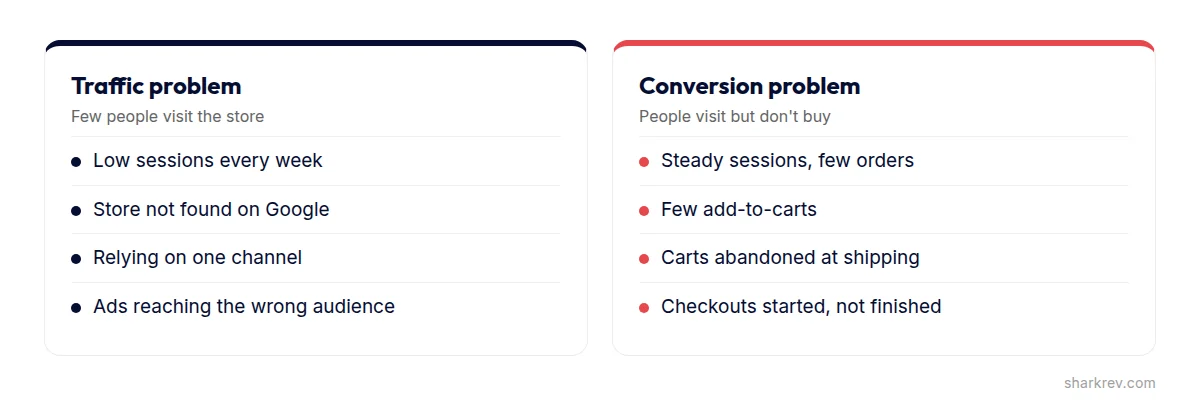
A store with no sales always has one of two problems: not enough of the right people are visiting, or the people who visit aren’t buying. The fixes for each are completely different, so the most important thing you can do first is find out which problem you have.
This guide shows you how to diagnose your store, the 12 most common reasons Shopify stores don’t sell, and what to fix first.
Quick answer
Shopify stores usually don’t make sales for two reasons: too little relevant traffic, or visitors who don’t buy. Check your sessions and conversion funnel in Shopify Analytics. If traffic is low, work on SEO and your marketing channels. If visitors come but don’t buy, look at trust signals, product photos and descriptions, surprise shipping costs, mobile speed, navigation, and checkout friction.
Traffic problem or conversion problem?
Open Shopify Analytics and look at two things: how many sessions your store gets, and your conversion funnel. Shopify breaks this into sessions, visitors who added to cart, visitors who reached checkout, and visitors who completed a purchase.
- If you get very few sessions, you have a traffic problem. Nobody can buy from a store they never visit.
- If you get steady sessions but very few orders, you have a conversion problem. The store isn’t convincing visitors to buy.
- If you have both, fix conversion first. Sending more traffic to a store that doesn’t convert just costs more.
This is the same idea behind why websites get traffic but no leads: find where people drop off before spending more to bring them in.
If you don’t have enough traffic
1. Your store isn’t set up for search
Many Shopify stores launch with default page titles, one-line product descriptions, and collection pages with no text. Google has little to work with. For the full picture, see why a website doesn’t show up on Google.
The fix: write unique titles and descriptions for your products and collections, add helpful text to collection pages, and use descriptive image alt text.
2. You rely on one traffic channel
Stores that depend entirely on one ad platform or one social account are fragile. When costs rise or reach drops, sales stop overnight.
The fix: build at least two or three channels over time, like search, email, and one social or ad platform.
3. Your ads reach the wrong people
Cheap clicks from broad audiences can look like traffic in your reports while bringing almost no buyers.
The fix: judge ads by sales and cost per purchase, not clicks, and make sure each ad sends people to the most relevant product or collection, not just the homepage.
If visitors come but don’t buy
4. Your store doesn’t feel trustworthy
Shoppers are cautious with brands they don’t know. A store with no reviews, no About page, generic stock images, and hidden contact details gives them every reason to buy elsewhere.
The fix: show reviews on product pages, tell your brand story, display clear contact details and policies, and use real photos where you can.
5. Your product photos don’t sell
Online, photos replace touching the product. Small, dark, or inconsistent images make it hard to judge quality.
The fix: show several angles, close-ups of details, the product in use, and a sense of scale. Keep backgrounds and lighting consistent.
6. Your descriptions list features, not reasons to buy
Descriptions copied from a supplier, or a list of specs with no context, don’t answer the shopper’s real questions: Will it fit? Will it work for me? Why this one?
The fix: lead with the benefit, then give the details: sizing, materials, dimensions, care, and what’s included. Answer common questions right on the page.
7. Shipping costs appear as a surprise
Unexpected costs at checkout are one of the most common reasons shoppers abandon a purchase. If shipping costs or delivery times only appear at the last step, many people leave.
The fix: show shipping costs and delivery estimates on product pages and in the cart, or offer free shipping above a clear order value.
8. Your store is slow on mobile
Every Shopify app you install can add code to your storefront. Stores with dozens of apps, large images, and heavy themes can feel sluggish on phones, where most shoppers browse.
The fix: remove apps you don’t use (and check that they didn’t leave code behind in your theme), compress images, and test your store on a real phone.
9. Products are hard to find
Confusing menus, collections with vague names, and weak search make shoppers work too hard.
The fix: organize collections the way customers think, use clear menu labels, and make sure search and filters work well on mobile.
10. Checkout creates friction
Forcing shoppers to create an account, offering few payment methods, or adding unexpected steps all cost you orders at the very last moment.
The fix: allow guest checkout, enable accelerated payment options like Shop Pay, Apple Pay, Google Pay, and PayPal where available, and keep checkout as simple as possible.
11. Your returns policy is unclear
When shoppers aren’t sure they can return something, buying feels risky, especially for clothing, shoes, and higher-priced items.
The fix: write a clear, fair returns policy and link to it from product pages, the cart, and the footer.
12. You don’t follow up with shoppers who leave
Many shoppers add products to their cart and leave, planning to come back. Without a reminder, most never do.
The fix: turn on Shopify’s abandoned checkout emails and write a friendly reminder. Consider a small incentive, but test before discounting everything.
Is your Shopify store getting visitors but not sales?
We’ll find where your store is losing buyers and fix it, from product pages and speed to checkout.
Improve My Shopify StoreHow to read Shopify Analytics for sales problems
Shopify’s reports show more than total sales. A few views are especially useful when sales are slow:
- Sessions by traffic source: which channels bring visitors, and which of them actually buy.
- Sessions by device: if mobile visitors convert much worse than desktop visitors, your mobile experience needs attention.
- Sessions by landing page: which pages people arrive on, and whether those pages lead anywhere.
- Conversion funnel: added to cart, reached checkout, and completed purchase, so you can see where shoppers stop.
Compare these views week by week, and after every change you make, so you know what’s working.
Building trust as a new brand
Shoppers are much more cautious with stores they’ve never heard of. If your brand is new, trust needs extra attention:
- An About page with the real story and people behind the brand.
- Real product photos, not only supplier images.
- Reviews, even a small number, displayed clearly.
- Clear shipping, returns, and contact information.
- A consistent, professional design across every page.
- Social proof from real customers, like photos or mentions.
Mobile shopping checklist
- Menu and search easy to use with one hand.
- Product photos that can be swiped and zoomed.
- Variant options easy to select.
- Add to Cart visible without hunting.
- Cart and checkout that load quickly.
- Wallet payment options for fast checkout.
- No pop-ups blocking the page on arrival.
Make your best products easy to find
Most stores sell a handful of products far more than the rest. Feature those best sellers on the homepage, in navigation, and in collections, and make sure their product pages are your strongest: best photos, clearest descriptions, and most reviews. Improving the pages that already get the most attention usually has the biggest effect on sales.
Quick wins you can do this week
- Check your sessions and conversion funnel in Shopify Analytics.
- Show shipping costs and delivery times before checkout.
- Add reviews to your product pages.
- Improve photos on your five best-selling or most-visited products.
- Rewrite those product descriptions around benefits and common questions.
- Remove apps you no longer use.
- Turn on abandoned checkout emails.
- Place a real test order on your phone, from homepage to confirmation.
When to get expert help
If you’ve fixed the obvious issues and sales are still slow, the problem is often a mix of smaller ones: theme performance, app conflicts, weak product page structure, and checkout issues that only show up on certain devices.
At SharkRev, we review your Shopify store the way a shopper experiences it, find the biggest leaks, and fix them in order of impact, from product pages and speed to checkout.
Frequently asked questions
How long does it take to get the first sale on Shopify?
It depends on your traffic, product, and price. Some stores sell in the first week, others take months. If you get steady traffic and no sales after a few weeks, treat it as a conversion problem and start diagnosing.
What is a good conversion rate for a Shopify store?
It varies a lot by industry, price, and traffic source, so avoid comparing yourself to a single number. Track your own rate and improve it step by step.
Do too many apps slow down Shopify?
They can. Many apps add scripts to your storefront. Remove the ones you don’t use, and check your theme for leftover code from uninstalled apps.
Should I offer discounts to get more sales?
Discounts can help with a specific goal, like clearing stock or winning back abandoned carts, but they don’t fix trust, product page, or checkout problems. Fix those first.
Is Shopify SEO worth it for a small store?
Yes. Search traffic keeps coming without paying per click. Start with product titles, descriptions, collection text, and image alt text.
Why do people visit my Shopify store but not buy on mobile?
Common reasons include slow loading, hard-to-use menus and options, hidden Add to Cart buttons, pop-ups, and a checkout that’s awkward on small screens.
How can a new Shopify store build trust quickly?
Show real photos and people, collect and display reviews, make policies easy to find, and keep your design consistent and professional.