

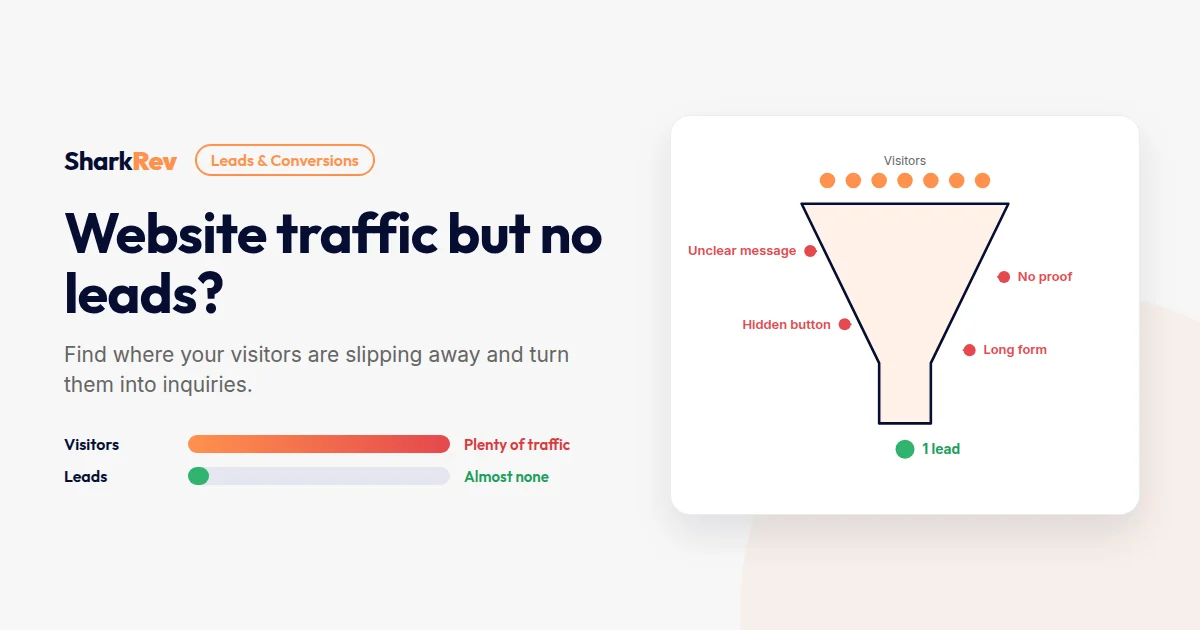
Your analytics show people are visiting your website. Some days, quite a lot of them. But the contact form stays quiet, the phone doesn’t ring, and nobody books a call.
Traffic without leads is one of the most frustrating website problems, because it feels like the hard part is done. The good news is that when people are already arriving, the fixes are usually on the website itself, and they’re often faster and cheaper than finding more traffic.
Here are the 9 most common reasons websites get visitors but no leads, how to find where yours is leaking, and what to fix first.
Quick answer
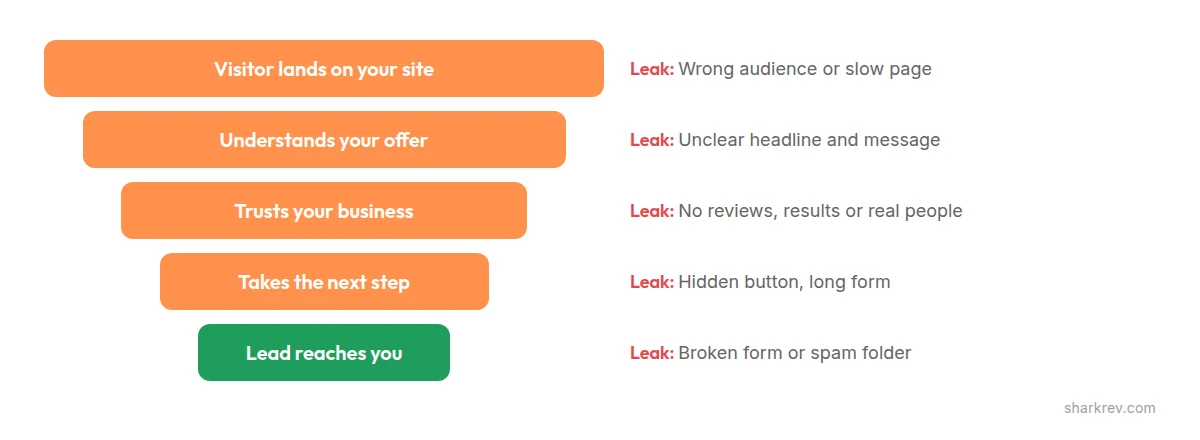
Websites usually get traffic but no leads for one of these reasons: the traffic isn’t the right audience, visitors can’t quickly understand what you offer, the next step is hidden or unclear, there’s no proof you can be trusted, the contact form is too long or broken, or the site is slow or hard to use on mobile. Find where visitors drop off, then fix the biggest leak first.
First: is it the right traffic?
Before changing your website, check who is visiting. In Google Analytics, look at where visitors come from and which pages they land on. In Google Search Console, look at the searches that bring people to your site.
If most of your visitors come from searches that have nothing to do with buying, like students reading a blog post or people in countries you don’t serve, more traffic of the same kind won’t help. If your site isn’t showing up on Google for the searches your customers actually use, that’s a visibility problem, not a conversion problem.
If the traffic looks right, the leak is on the website. Keep reading.
9 reasons your website gets traffic but no leads
1. You’re attracting the wrong visitors
Not all traffic is equal. A blog post that ranks for a general question can bring thousands of visitors who will never need your service. Ads aimed at a broad audience can do the same.
The fix: focus content and ads on the problems your buyers search for, and make sure every popular page links to a relevant service or offer.
2. Visitors can’t tell what you do in five seconds
When someone lands on your homepage, they should instantly understand what you offer, who it’s for, and why it matters to them. Headlines like “Welcome to our website” or “Innovative solutions for your business” say nothing.
The fix: rewrite your main headline around the customer’s problem and the result you deliver. Plain words beat clever ones.
3. The next step is hidden or unclear
Many websites make visitors hunt for how to get in touch. The only contact option is a small link in the menu, or the button just says “Submit” or “Learn more”.
The fix: give every key page one clear call to action that says exactly what happens next, like “Book a free 30-minute call” or “Get your free quote”. Repeat it after important sections, not just at the bottom.
4. Too many choices
Pages with ten buttons, three pop-ups, and links to everything make visitors think harder than they want to. Confused visitors leave.
The fix: decide on the one action you want most on each page, and make it the most visible element. Secondary options should look secondary.
5. There’s no proof you can be trusted
People rarely contact a business they know nothing about. Without reviews, examples of your work, real names and faces, or clear business details, visitors have no reason to believe you’ll deliver.
The fix: show real reviews, project examples with results, your team, and your contact details. Place proof near your calls to action, where hesitation happens.
6. Your contact form creates friction
Long forms, required phone numbers, confusing dropdowns, and difficult captchas all stop people at the final step. So does a form with no reassurance about what happens after they submit it.
The fix: ask only for what you need to reply, usually name, email, and a short message. Add a line like “We reply within one business day” next to the button.
7. The site is slow or awkward on mobile
Many of your visitors are on phones. If pages load slowly, buttons are too small, or forms are hard to fill in on a small screen, they give up. Speed matters here too: see why WordPress websites get slow and how to fix it.
The fix: test your site on your own phone as if you were a customer. Try to find your service, understand it, and contact you in under a minute.
8. You’re asking for too much, too soon
If the only option is “Request a proposal” or “Buy now”, visitors who aren’t ready yet simply leave. Many are interested, just not ready to commit.
The fix: offer a lower-commitment step alongside your main one, like a free audit, a short call, a checklist, or a WhatsApp chat.
9. The leads are coming in, but you never see them
This happens more often than most businesses realize. Contact form emails land in spam, notification emails go to an old address, or a plugin update quietly breaks the form.
The fix: submit your own contact form today and check that the message arrives. Then repeat the test every month, and after every plugin update.
Getting visitors but not inquiries?
We’ll find where your website is losing potential customers and fix the leaks, from messaging and design to forms and speed.
Fix My Website’s LeadsHow to find where your visitors drop off
You don’t have to guess. A few free tools show exactly where the leak is:
- Google Analytics: see which pages get traffic, how long people stay, and which pages lead to form submissions.
- Microsoft Clarity: a free tool that records anonymous visitor sessions and shows heatmaps, so you can watch where people click, scroll, and give up.
- Google Search Console: see which searches bring visitors, and whether they match what you sell.
- Your own test: ask someone who doesn’t know your business to find your service and contact you on their phone, and watch them without helping.
If you run an online store, the same logic applies to sales: find the stage where shoppers drop off, from product page to cart to checkout, and fix that first.
Quick fixes you can make this week
- Submit your own contact form and confirm the message arrives.
- Rewrite your homepage headline around the customer’s problem and your result.
- Add one clear, specific call to action to every key page.
- Place reviews and real results near your buttons.
- Shorten your form to the essentials.
- Add a low-commitment option, like a free audit or short call.
- Test the full journey on your phone.
- Install a free heatmap tool and watch how real visitors behave.
When to get expert help
If you’ve made the quick fixes and leads are still rare, the problem is often deeper: page structure, positioning, the offer itself, or technical issues you can’t see from the front end. That’s when a fresh, experienced pair of eyes pays off.
At SharkRev, we look at your website the way your customers do, find where they drop off, and rebuild the journey so more visitors turn into real inquiries.
Frequently asked questions
How many visitors should turn into leads?
It varies widely by industry, offer, and traffic source, so there’s no single right number. The most useful benchmark is your own: measure your current rate, make one improvement, and compare.
Should I get more traffic or fix my website first?
If you already get steady traffic but few leads, fix the website first. Sending more visitors to a page that doesn’t convert usually just costs more.
Why are my visitors leaving so quickly?
Common reasons are slow loading, an unclear first impression, a mismatch between what they searched for and what they found, or a page that’s hard to use on mobile.
Do pop-ups help or hurt lead generation?
A well-timed, relevant offer can help. Pop-ups that appear instantly, cover the page on mobile, or are hard to close usually hurt, and Google discourages intrusive pop-ups on mobile.
How long does it take to see more leads after fixing my website?
Simple fixes, like a broken form or an unclear call to action, can show results within days. Larger changes to messaging and structure usually need a few weeks of traffic to measure properly.